
How to Create and Post Articles on AladdinStores from Your dashboard
Overview
AladdinStores allows selected sellers to publish articles (blogs) directly from their Seller Dashboard.
These articles can include product tips, style guides, tutorials, brand stories, or educational content that helps buyers discover your products and trust your store.
All articles must be submitted for Admin review before they appear publicly.
Benefits of Publishing Articles
Publishing articles helps you:
- Build your brand identity
- Provide value to buyers
- Increase product visibility
- Improve buyer engagement
- Rank higher in marketplace and Google search results
- Showcase expertise in your category
BLOG POSTING POLICY FOR SELLERS (AladdinStores)
To maintain quality and professionalism across the marketplace, all sellers must follow these rules when creating articles.
- Content Must Be Relevant
Your article must relate to:
- Your products
- Your store’s category
- Buyer education
- Tips, guides, tutorials, or brand stories
Unrelated content is not allowed.
- No External Store Links
You may NOT include:
- Links to your own website
- Competitor platforms
- WhatsApp for sales
- Social media links for buying
Links inside articles may only point to:
- Your AladdinStores product pages
- Helpful educational references (if approved)
- Content Must Be Original
Your article must be written by you.
Copied or AI-generated article spam is not allowed.
- No Misleading Claims
Do NOT promise:
- Medical cures
- Guaranteed results
- False benefits
- Fake brand names
Admin will remove misleading content.
- Images Must Be High Quality
Only upload clean, clear images that belong to you or are royalty-free.
Low-resolution, watermarked, or stolen images are not allowed.
- Professional Tone Required
Articles must be written clearly, respectfully, and without:
- Slang
- Offensive language
- Political or religious content
- Admin Approval Is Mandatory
All posts undergo review before being published.
Admin reserves the right to:
- Edit
- Reject
- Remove
- Request updates
- Posting Limits
To maintain article quality, sellers may have posting limits depending on their subscription plan or approval status.
CONTENT QUALITY CHECKLIST (Before You Submit an Article)
Use this checklist to ensure your article meets AladdinStores standards.
Content Quality
- Is your article original?
- Is the information accurate and helpful?
- Is the topic relevant to your store and buyers?
- Is it free of spelling/grammar mistakes?
Structure & Readability
- Does your article have a clear title?
- Does it include headings or sections?
- Are paragraphs short and easy to read?
- Did you use bullet points where necessary?
Product Integration
- Did you add relevant product links (optional but recommended)?
- Are product mentions natural, not spammy?
Visuals
- Are images high quality and properly placed?
- No watermarks, logos, or copyrighted content?
- Featured image added?
Compliance
- No external purchase links
- No misleading claims
- No prohibited content
- No violations of AladdinStores policies
Final Review
Before clicking “Submit,” ask yourself:
✔ Is this article valuable to buyers?
✔ Does it represent my brand professionally?
✔ Would Admin approve this without changes?
✔ Would this article comply with all AladdinStores policies and guidelines?
Guide: How to Create an Article (Step-by-Step)
In order to post Articles from your seller dashboard.
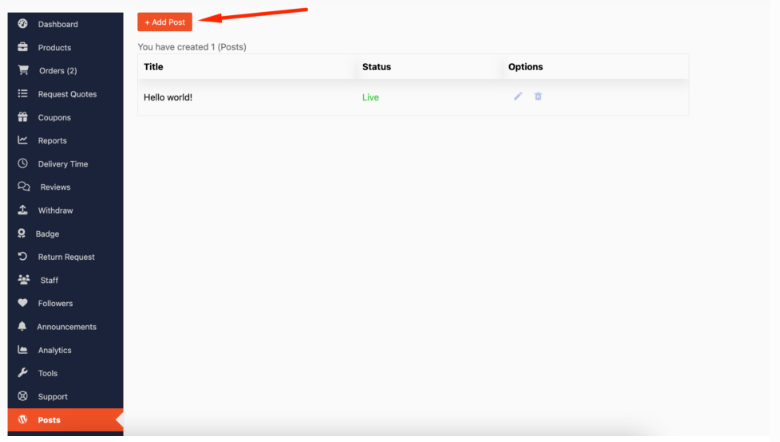
Step 1: Log in to your Seller Dashboard and navigate to the Posts section from the left menu.
Go to Dashboard → Posts (or “Articles).

Step 2: Click “Add New Post”
This will open the article creation form.
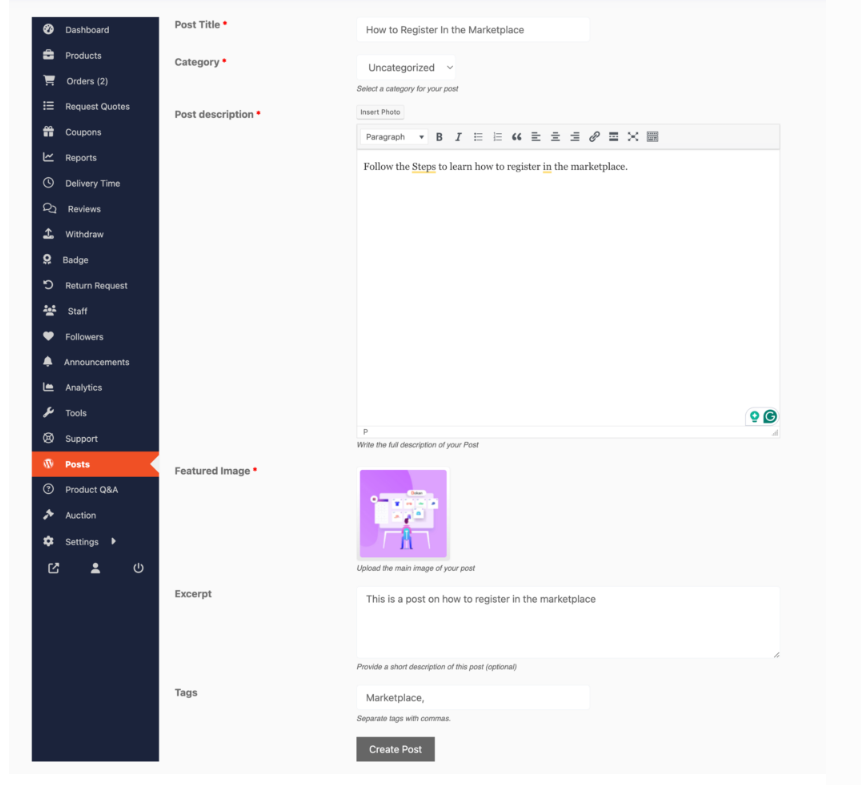
Step 3: Enter a title for your article and fill in the content you wish to provide.
Choose a clear, descriptive title such as:
- “How to Choose the Right Perfume for Your Skin Type”
- “5 Tips for Styling Your Abaya”
- “Beginner’s Guide to Caring for Leather Shoes”
You will now see your posts listed as published.
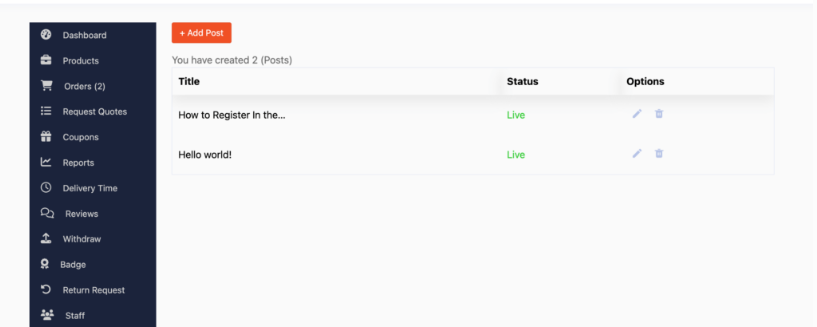
That’s it. You’re all set and ready to move on.
Step 4: Write Your Content
Use the content editor to create your article.
You can include:
- Text
- Images
- Headings
- Bullet points
- Product links
Step 5: Select a Category
Choose the most relevant category (e.g., Fashion Tips, Home Guide, Beauty Advice).
Step 6: Add a Featured Image
This image will appear as the article thumbnail.
Step 7: Submit for Review
Click Submit for Review.
Your article will be sent to the AladdinStores Admin Team to ensure:
- Quality
- Accuracy
- Compliance with platform rules
Once approved, it will be published on your Store Page and the Marketplace Blog.
